Lead Follow Up System: 8 Best Tools to Convert
Discover the 8 best lead follow up system tools. Compare features, pricing & automation to convert more prospects into customers faster.

William Turner
Hey, I’m William, founder of William & Friends in Denver. We help service businesses get found, get chosen, and get booked. SEO, CRO, and ads tied to clean reporting. Recent wins include 908% year-over-year traffic for a commercial laundry brand and 39% more revenue attributed to organic search for a Denver studio. I write about conversion math, offer-to-channel fit, and operator-grade marketing. If you want the truth about where your pipeline leaks, grab the free marketing audit.
Dec 8, 2025
5
A lead follow up system automates prospect engagement after initial contact, ensuring consistent communication without overwhelming your team. For service-based businesses operating in competitive markets, these systems determine whether leads become customers or disappear into competitors' pipelines. Speed matters, responding within one minute leads to 391% more conversions compared to responding after an hour.
At William & Friends, we help service-based businesses build marketing systems that actually work. Lead follow-up sits directly between inquiry and revenue, making it one of the highest-leverage improvements you can make.
TL;DR: Lead Follow Up System
Lead follow up systems automate prospect engagement across multiple channels after initial contact. The best tools combine automated multi-channel sequences, intelligent lead scoring, seamless CRM integration, and robust analytics. Response speed dramatically impacts conversions—one-minute responses convert 391% better than hour-long delays. Successful implementation requires matching tool capabilities to your sales cycle, team size, and tech stack while balancing automation with personalization. Effective systems deploy 5-8 touchpoints across 3+ channels over 2-4 weeks, prioritize high-intent leads through scoring, and use clear exit criteria to avoid wasting resources.
Key Points |
|---|
|
What Lead Follow-Up Systems Do (and Why Response Speed Matters)
Lead follow up software automates prospect engagement after initial contact through your website, phone, or field operations. These systems track every interaction, schedule follow-ups across multiple channels, and ensure no lead disappears between inquiry and sale.
The difference between good and great operators comes down to what happens in the first five minutes after a lead arrives. Research shows 82% of consumers expect responses within 10 minutes, yet average response time sits at 12 hours and 10 minutes. That gap represents opportunity.
For service-based businesses where phone calls drive conversions, the stakes are higher. Phone leads convert at 37% during the initial call, with home services reaching conversion rates as high as 46%. When your competitor answers immediately and you respond tomorrow, the decision gets made without you.
Speed creates competitive advantage, but consistency determines whether you close deals. Slow response times cause 52% of customers to stop purchasing entirely. A follow-up process that prioritizes both speed and systematic engagement transforms inquiry volume into predictable revenue.
Essential Features That Separate Good Tools from Great Ones
Not all lead tracking solutions deliver the same results. The tools that actually move conversion numbers share specific capabilities beyond basic email automation.
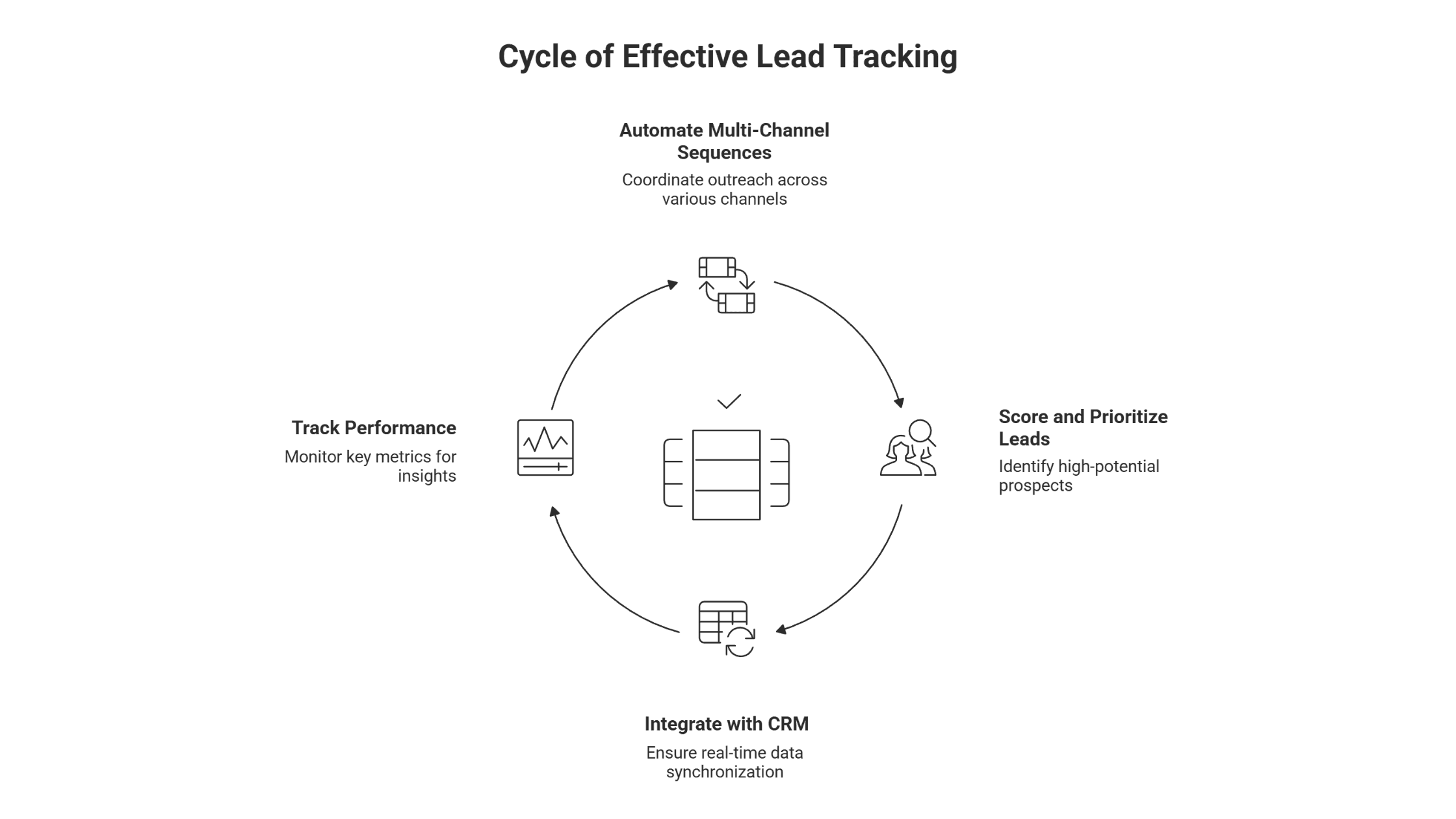
Automated Multi-Channel Sequences
Single-channel follow-up doesn't work anymore. Sales sequences using 3+ channels experience 287% higher response rates than email-only approaches. The best lead follow up systems coordinate outreach across email, SMS, phone calls, and social media without manual intervention.
Effective multi-channel automation alternates between communication methods rather than hitting prospects through every channel simultaneously. Sequences that alternate between channels see 23% higher engagement than simultaneous multi-channel blasts. Your HVAC lead receives an immediate text confirmation, followed by an email with service details, then a phone call two days later if they haven't responded.
Channel selection matters as much as frequency. Text messages achieve 98% open rates with 97% opened within 15 minutes, while video in follow-up emails increases click-through rates by 96%. The right system lets you deploy each channel at optimal moments based on lead behavior and source.
Lead Scoring and Prioritization
Volume without prioritization wastes time. Lead management software should identify which prospects deserve immediate attention versus which need longer nurturing sequences.
Modern lead scoring uses behavioral data, engagement patterns, and demographic information to predict conversion likelihood. Companies implementing AI-powered lead scoring report a 25% increase in lead quality and 15% increase in conversion rates. The system automatically routes your highest-scoring leads to experienced technicians while nurturing lower-intent prospects through educational content.
Effective scoring considers multiple dimensions simultaneously. A homeowner who downloaded your emergency repair guide, visited your pricing page twice, and lives in your service area scores higher than someone who clicked one email link. Companies that nurture leads properly close 50% more sales while spending 33% less.
CRM Integration and Data Sync
Your crm lead tracking and follow-up system must communicate in real-time. Manual data entry between platforms creates gaps where leads disappear, duplicate outreach confuses prospects, and conversion tracking becomes impossible.
Real-time, two-way synchronization ensures updates in one system immediately reflect across all platforms. When a technician updates job details in your field service software, that information instantly appears in your CRM and triggers appropriate follow-up sequences.
Integration requirements extend beyond basic data transfer. Your system should support sophisticated automation branching with IF/THEN logic that responds to lead behavior. A prospect who opens your quote email but doesn't respond triggers a different sequence than someone who ignores it entirely.
Analytics and Performance Tracking
Measurement determines whether your system improves conversion rates or just automates bad processes. Lead management tools should track metrics that reveal what's working and what's breaking.
Critical KPIs include lead response time, sales meeting success rate, and lead-to-customer conversion rate. Lead Velocity Rate tracks month-over-month growth in qualified leads, revealing whether your follow-up improvements generate momentum or stall out.
The best systems provide channel-specific performance data. You discover that email follow-ups convert better for maintenance inquiries while phone calls work best for emergency services. This intelligence lets you adjust sequences by lead source rather than using identical approaches for fundamentally different prospects.
The 8 Best Lead Follow-Up System Tools
1. GoHighLevel – Best All-in-One Platform for Service Business Revenue Operations
GoHighLevel consolidates CRM, pipeline management, email automation, SMS, calling, appointment scheduling, reputation management, and reporting into one unified system. Starting at $97/month for unlimited contacts and sub-accounts, it delivers enterprise functionality at a fraction of typical SaaS stack costs.
Unlike tools that force you to cobble together Zapier integrations between 6+ platforms, GoHighLevel operates as a single source of truth. Lead comes in from your website? It's captured, scored, assigned, followed up via multi-channel sequences, and tracked through conversion without touching another system. No data leakage. No integration failures at 2am.
The platform's white-label capability matters if you operate multiple brands or locations. You control the entire client experience under your domain, not a third-party interface your team needs to learn and your clients need to trust.
Why we exclusively use a custom GoHighLevel setup for client systems:
Unified data architecture. When SEO rankings drive calls, PPC generates form fills, and email sequences nurture prospects, everything flows into one pipeline with complete attribution. You know exactly what's working because nothing lives in siloed platforms fighting over credit.
Automation without developers. Visual workflow builders let you create sophisticated sequences that most businesses pay $15K+ to custom-code. Trigger actions based on page visits, email opens, missed calls, form submissions, or calendar bookings. If/then logic handles complex scenarios without technical debt.
Native calling and SMS. Click-to-call from lead records with automatic logging. Two-way SMS conversations appear in unified inboxes. Voicemail drop, call recording, and conversation tracking are standard, not $50/month add-ons.
Appointment infrastructure. Calendar booking, automated reminders, confirmations, and follow-ups prevent no-shows that kill service business margins. Round-robin distribution ensures leads connect with available team members instantly.
Reputation automation. Post-service review requests go out automatically via SMS with one-click Google/Facebook links. Happy customers get funneled to public reviews; unhappy ones get routed to private feedback forms before they hit Yelp.
Reporting that matters. Revenue dashboards show lead source ROI, conversion rates by channel, pipeline velocity, and team performance without exporting CSVs to Excel. Attribution connects marketing spend directly to closed revenue.
The platform's weakness? It requires strategic setup. GoHighLevel gives you the tools; it doesn't tell you what sequences to build, how to score leads for your business model, or which automation logic converts your specific audience. That's why businesses working with us get complete funnel and CRM implementation that's customized to their conversion math, not generic templates.
Best for: Service businesses serious about revenue operations who want one system handling everything from lead capture to client nurturing. Essential for agencies managing multiple clients or brands. Ideal for operators prioritizing leverage over learning curves and willing to invest in proper setup rather than fighting platform limitations.
See how we deploy our system that eliminates revenue leaks and turn your marketing into a predictable growth engine.
2. HubSpot Sales Hub – Best for Growing Service Businesses Needing Full-Stack Capabilities
HubSpot offers comprehensive lead follow up capabilities with strong CRM integration built for scaling operations. Sales Hub Professional starts at $100 per month per seat, with Starter tiers available from $15-$20 per seat for smaller teams.
The platform excels at automated workflow creation with visual builders that don't require technical expertise. Multi-channel sequences coordinate email, SMS, and phone tasks while tracking every interaction in a unified timeline. Lead scoring happens automatically based on engagement patterns.
HubSpot's strength lies in its ecosystem. Marketing Hub, Service Hub, and Operations Hub work together seamlessly, eliminating integration headaches common with cobbled-together systems. However, pricing jumps dramatically at higher tiers—full omnichannel automation costs $890/month for 2,000 contacts. The free plan is generous but restricts you to one pipeline, limiting businesses with multiple service lines.
Best for: Service businesses with $500+/month budgets needing integrated sales and marketing capabilities, extensive third-party integrations, and plans to scale beyond pure sales into customer success.
3. Pipedrive – Best for Visual Pipeline Management in Field Services
Pipedrive focuses on visual pipeline management that helps field service teams track leads through clear stages. Pricing starts around $14 per user per month for basic plans, with advanced features at $39 per user—40-50% less than HubSpot's comparable tier.
The platform uses drag-and-drop deal cards that move through customizable pipeline stages. Pipedrive's interface makes it easier to track calls, conversations, and priorities at a glance. Mobile accessibility ensures field teams update lead information during service calls.
Smart Docs automatically creates trackable proposals, quotes, and contracts with eSignature capability, essential for consulting and professional services firms. However, the platform's weakness is marketing automation; service businesses wanting email campaigns need external integrations.
Best for: Small-to-mid-sized service businesses (2-10 salespeople) prioritizing deal tracking, proposal generation, and predictable pricing over complex marketing campaigns.
4. ActiveCampaign – Best for Email-Heavy Nurturing Sequences
ActiveCampaign specializes in sophisticated email automation with powerful segmentation capabilities, serving businesses where education and trust-building happen primarily through email content before conversion.
Multi-step sequences branch based on recipient behavior. Someone who opens your email about routine maintenance receives different follow-ups than someone clicking your emergency repair links. With 900+ pre-built automation recipes tailored to specific business types, the platform minimizes setup complexity.
The system integrates well with email providers and includes built-in lead scoring based on engagement metrics. However, ActiveCampaign has a steeper learning curve for complex automations, and CRM functionality is only available on Plus, Professional, and Enterprise plans—not as a free tier.
Best for: Service businesses with longer sales cycles (10+ team members, $50+/month budgets) requiring sophisticated lead nurturing, behavioral triggers, and extensive pre-built automation templates.
5. Salesmate – Best for Teams Prioritizing Calling and Phone Follow-Up
Salesmate emphasizes phone-based follow-up with built-in calling features and conversation tracking, making sense for service businesses where direct voice communication converts better than written messages.
The system includes click-to-call functionality, automatic call logging, and voicemail drop capabilities that save time during high-volume outreach. Follow-up reminders appear immediately after calls, ensuring no lead falls through cracks between conversations.
Lead scoring considers phone engagement alongside digital behavior, helping teams identify prospects who respond better to calls versus those preferring text communication.
6. Zoho CRM – Best for Budget-Conscious Teams Needing Core Features
Zoho CRM offers robust lead follow up functionality at accessible price points, with a free tier for basic needs and paid plans starting around $14-$23 per user monthly. This makes it viable for smaller service businesses establishing systematic follow-up for the first time.
The platform includes lead scoring, automated workflows, and multi-channel communication tools without premium pricing. Visual pipeline management helps teams track leads through conversion stages, while customizable automation handles routine follow-ups automatically.
Zoho's extensive integration marketplace connects with accounting software, scheduling tools, and communication platforms common in service operations.
7. Freshsales – Best for AI-Powered Lead Scoring and Prioritization
Freshsales emphasizes intelligent lead scoring using AI and machine learning to identify high-conversion prospects. The system analyzes patterns across your historical data to predict which leads deserve immediate attention.
Automated lead distribution routes inquiries based on geography, service type, and team availability. Follow-up sequences adjust dynamically based on engagement signals—prospects showing high intent receive accelerated outreach while low-engagement leads enter longer nurturing sequences.
The platform includes phone, email, and chat capabilities within a unified interface. Pricing starts with free tiers for basic functionality and scales to approximately $9-$69 per user for advanced features.
8. LeadSquared – Best for High-Volume Lead Capture Across Multiple Sources
LeadSquared specializes in capturing and routing leads from diverse sources—website forms, phone calls, social media, walk-ins, and referrals. This multi-source capture matters for service businesses generating leads through various marketing channels simultaneously.
The platform's automated lead distribution instantly routes inquiries to appropriate team members based on complex rules considering location, service type, and current workload. Real-time tracking shows lead progress through conversion stages with detailed activity logging.
Follow-up automation coordinates outreach across channels while preventing duplicate contact. If a lead receives a call from one technician, the system blocks automated emails from another team member until appropriate time passes.
How to Choose the Right Lead Follow-Up System for Your Business
Selection criteria matter more than feature lists. The right tool matches how your specific operation actually converts prospects into customers.
Match Tool Capabilities to Your Sales Cycle Length
Sales cycle length determines which features you need most. Home services sales cycles are lengthening as customer journeys grow more complex, with 59% of customers spending a week or less on purchasing decisions while others deliberate longer.
Short-cycle businesses converting prospects within days need systems emphasizing speed and immediate engagement. Your automated follow up should trigger within minutes, prioritize phone contact, and include SMS confirmations. Tools with strong mobile capabilities let field technicians respond from job sites rather than waiting until office hours.
Longer sales cycles requiring education and trust-building need sophisticated nurturing sequences. These systems should support multi-touch campaigns over weeks, deliver educational content systematically, and track engagement across multiple interactions before triggering sales conversations. Nurtured leads close 50% more deals while costing 33% less than unnurtured prospects.
Consider Team Size and Collaboration Needs
Solo operators need different capabilities than five-person teams or 20-person operations. Single-person businesses benefit from systems with simple setup, minimal management, and strong automation that handles routine follow-up independently.
Teams of 2-5 people require clear lead assignment rules, visibility into who's handling which prospects, and collaboration features preventing duplicate outreach. The system should show when teammates last contacted a lead, what was discussed, and what happens next.
Larger operations need sophisticated role-based permissions, territory management, and performance tracking across team members. The system should handle high lead volumes without performance degradation while providing managers visibility into individual conversion rates and follow-up consistency.
Your First 30 Days: Implementation Roadmap
Week 1: Foundation Setup (5-7 hours)
Start by auditing your current process. Map existing workflows and identify specific weaknesses like slow response times, inconsistent messaging, or missed follow-ups using SWOT analysis. Look at where leads drop off in your pipeline.
Import your last 90 days of leads into your new system and begin manual lead scoring while technical integration proceeds. This gives your team immediate data to work with rather than waiting for perfect automation. Common roadblock: CRM integration fails due to API limits. Solution: Start with manual import to begin scoring while technical integration proceeds in parallel.
Set up basic lead capture forms and test them across your website, landing pages, and key entry points. Configure immediate auto-response emails that acknowledge receipt and set expectations—these fire even while you're building complex sequences.
Week 2-3: Sequence Development and Team Training (8-10 hours)
Create standardized templates and timelines for different scenarios: post-meetings, no responses, reengagement. Develop personalized message templates that include specific intervals (Day 1, Day 4, Day 8) to ensure consistency.
Build your first 3-5 core sequences for your most common lead types. Start simple: emergency inquiries get phone-first sequences with 3-day windows, maintenance requests get email-heavy sequences over 2 weeks. Test these with small lead segments before rolling out broadly.
Provide tailored, ongoing training using bite-sized microlearning modules combined with personalized coaching rather than one-time training sessions—critical because 84% of sales training is forgotten within three months. Appoint a CRM champion responsible for driving adoption and serving as the go-to resource.
Week 4: Launch, Monitor, and Refine (3-5 hours)
Implement formal change management as part of your rollout. Celebrate quick wins by promoting early success stories and recognizing team members who embrace the new system.
Monitor key metrics daily: response times, follow-up completion rates, and initial conversion performance. Track where leads exit your funnel—if 40% drop off after the second touchpoint, that message needs work.
Establish Service Level Agreements (SLAs) between sales and marketing teams that outline expectations and responsibilities for lead generation and follow-up. This creates accountability from day one rather than letting responsibilities blur.
Common challenge: Team members bypass the system and revert to old habits. Solution: Tie system usage to performance reviews and provide ongoing support rather than treating launch as the endpoint.
Factor in Budget vs. ROI Expectations
Cost structures vary dramatically across platforms, from $12 to $500+ per user monthly depending on features and scale. Solo operators can access basic functionality for under $50 monthly total, while medium businesses typically spend $400-$2,000 monthly for full-featured systems.
The investment pays off quickly when implemented properly. 76% of companies see ROI within the first year of implementing sales automation, with 12% achieving returns in under a month. Organizations generate 451% more qualified leads while producing 50% more sales-ready leads at 33% lower cost per acquisition.
Calculate expected improvement in conversion rates against your average customer value and lead volume. If you currently close 15% of 100 monthly leads at $2,000 average job value, improving conversion to 20% through better follow-up generates an additional $12,000 monthly revenue. A system costing $500 monthly delivers 24x return in this scenario.
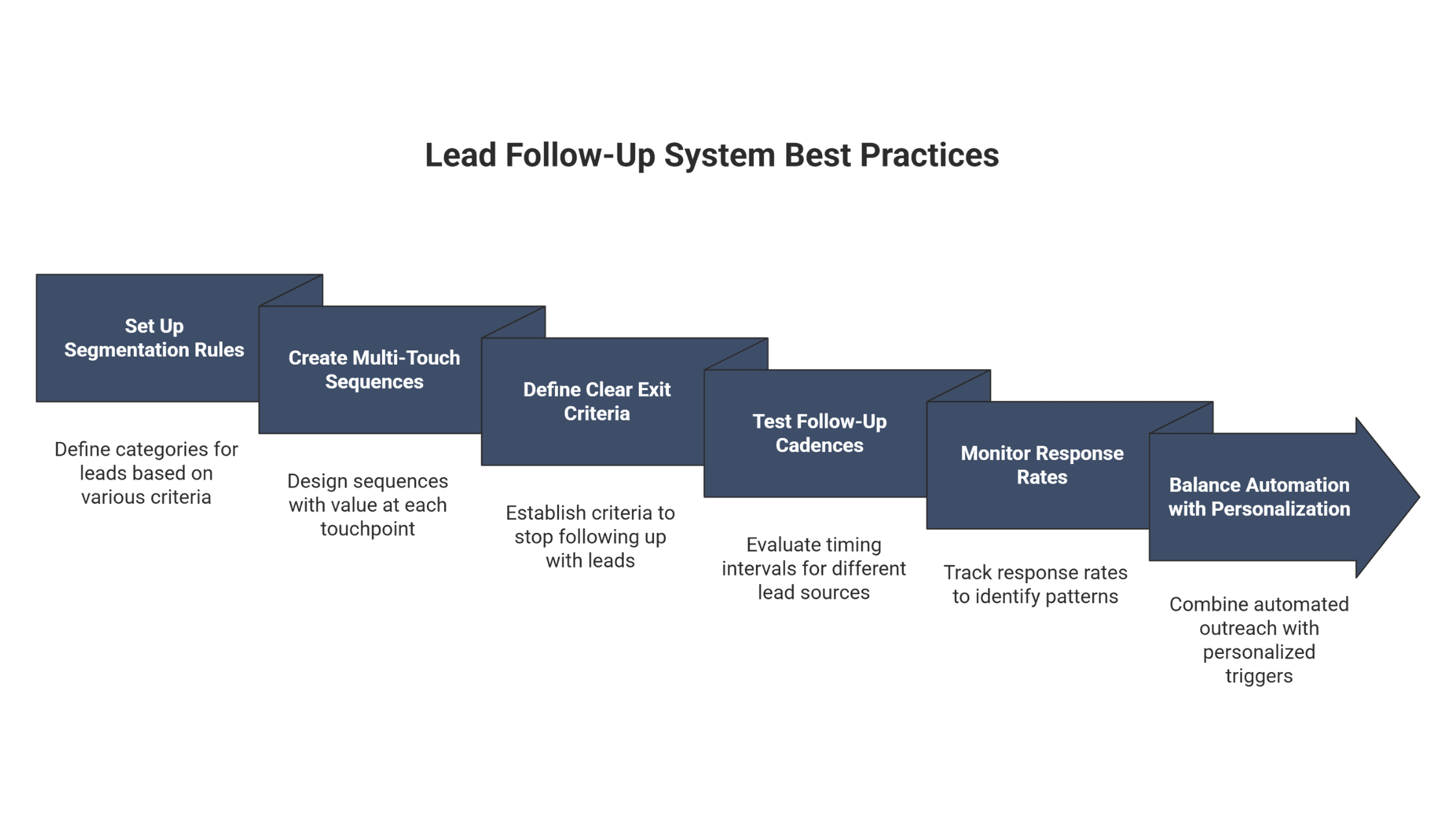
6 Best Practices for Maximizing Your Lead Follow-Up System
Implementation determines whether your system improves results or just digitizes broken processes. These practices separate operators who see 78% higher conversion rates from those who waste money on tools they never fully deploy.
Set Up Segmentation Rules from Day One
Generic follow-up sequences ignore that different lead types need different approaches. Emergency service inquiries require immediate phone contact, while maintenance quote requests respond better to email with detailed pricing and scheduling options.
Segment leads by source, service type, inquiry urgency, and geographic location from the start. A commercial prospect researching quarterly cleaning contracts needs different nurturing than a residential customer with an immediate plumbing emergency.
A Chicagoland mechanical contractor demonstrated this power by segmenting their plumbing and HVAC programs separately. After acquiring a plumbing division, they layered plumbing lead generation on top of their established HVAC infrastructure rather than treating all inquiries identically. Working closely with their SDR team for message refinement and list optimization, they secured a $16,320 preventative plumbing maintenance contract within three months and $700K+ in combined deals shortly after launch—demonstrating how proper segmentation lets you expand service lines without cannibalizing existing programs.
Create Multi-Touch Sequences with Value at Each Stage
Securing conversions requires 5-8 follow-up touches, yet 92% of sales reps quit after just four attempts. The difference between winning and losing often comes down to systematic persistence over 2-4 weeks.
Structure sequences so each touchpoint delivers value rather than just asking for business. First contact confirms receipt and sets expectations. Second touch provides educational content relevant to their inquiry. Third shares customer testimonials or case studies. Fourth offers scheduling links with availability.
Channel selection matters throughout sequences. Sequences combining email and phone touchpoints achieve 128% higher response rates than email-only approaches. Your third touchpoint might be an informational email while the fifth is a direct phone call referencing previous messages.
The most critical element is persistence backed by value. 80% of sales need at least 5 follow-ups, yet 44% of reps stop after just one. Your automated sequences should persist longer than human patience typically allows, using varied channels and value-driven messaging to maintain engagement without becoming annoying.
Define Clear Exit Criteria to Avoid Wasting Time
Not every lead deserves infinite follow-up. Clear exit criteria prevent teams from pursuing dead-end prospects while better prospects sit waiting for attention.
Exit indicators include explicit opt-out requests, consistent non-response across multiple channels over defined timeframes, or qualification criteria that make them poor fits. When a prospect ignores five touchpoints across three channels over three weeks, continuing automated follow ups wastes resources better allocated elsewhere.
Implement reactivation sequences for exited leads rather than deleting them entirely. Prospects who weren't ready to buy six months ago might need your services now. A quarterly reengagement email to dormant leads often converts previously unresponsive prospects whose circumstances changed.
Test Follow-Up Cadences by Lead Source
Different lead sources produce prospects at different stages of purchase readiness. Website form submissions might include early researchers, while phone inquiries often represent immediate needs. Your automated follow up cadence should match urgency level.
Test timing intervals between touchpoints for each source. Paid advertising leads might convert best with immediate contact followed by daily touchpoints over three days, while organic search leads respond better to initial contact with two-day gaps between subsequent touches. Following up within 3 days increases replies by 31%, but optimal timing varies by prospect context.
Consider how Trio Heating & Air approached multiple lead generation strategies including door-to-door outreach, flier distribution, billboard advertising, and acquired phone lines from shut-down HVAC companies. Each channel required different follow-up approaches, walk-up leads from door-to-door needed immediate scheduling attempts, while billboard inquiries benefited from educational content before sales conversations. By implementing ServiceTitan to track these distinct pathways, they identified which sources needed phone-first sequences versus email nurturing.
Monitor Response Rates and Adjust Timing
Conversion rates reveal whether your follow-up timing aligns with how prospects actually make decisions. Track response rates by touchpoint number, day of week, time of day, and channel to identify patterns.
The optimal follow-up window is narrow. Businesses that respond within five minutes are 100 times more likely to connect and convert prospects. Next-day follow-ups decrease response rates by 11%, while chances drop to just 24% after five days.
Leverage CRM automation features to set automated triggers for different scenarios. Send an SMS or call when acknowledgment is absent, or email a case study when prospects express doubt. Text messages have a 97% open rate within 15 minutes, whereas email varies widely—use this intel to prioritize channels based on urgency.
Balance Automation with Personalization Triggers
Automation handles volume, but personalization drives conversion. The best sales follow-up system combines systematic outreach with triggers that prompt human intervention at high-value moments.
Set up behavioral triggers that alert team members when prospects take specific actions. When someone watches 75% of your service video, visits your pricing page three times, or opens five consecutive emails, that engagement signals readiness for direct conversation. These triggers should pause automated sequences and route the lead to experienced sales staff immediately.
Personalization doesn't require writing unique emails for every prospect. Use dynamic content that references specific services they inquired about, their location, or previous interactions. Personalized cold emails achieve 32% higher response rates than generic messages, and referencing previous interactions increases responses by 62%.
Common Lead Follow-Up System Mistakes to Avoid
Implementation failures follow predictable patterns. Avoiding these mistakes prevents wasted investment in tools that never deliver results.
Low team adoption kills implementation success. The biggest obstacle isn't the technology, it's the people. Many implementations fail because sales teams resist new processes regardless of their potential benefits. Implement formal change management as part of your rollout, not as an afterthought. Use bite-sized microlearning modules combined with coaching rather than one-time training sessions. Celebrate quick wins by promoting CRM success stories and recognizing early adopters.
Insufficient stakeholder alignment derails progress. CRM implementations often lack direction because key stakeholders (leadership, department heads, end users) aren't adequately engaged from the start. Involve stakeholders early and continuously, holding regular alignment meetings between IT, sales, marketing, and customer service.
Poor data quality undermines everything. Service businesses struggle with inconsistent follow-up processes and generic messaging templates. These weaknesses lead to scattered engagement tracking, inconsistent follow-ups result in 220% lower reply rates. Consolidate communication channels using a single CRM platform to track all interactions and eliminate scattered engagement across unconnected tools.
Lack of post-implementation support stagnates systems. Many service businesses treat the CRM go-live date as the finish line rather than the beginning. Establish dedicated post-launch support by appointing a CRM manager or admin responsible for troubleshooting, answering questions, and maintaining system health. Gather and act on user feedback regularly, implementing improvements based on real-world experience.
William & Friends specializes in building marketing operations where measurement drives continuous improvement rather than operating blind.
Frequently Asked Questions
What is the difference between a lead follow-up system and a CRM?
Lead follow-up systems focus specifically on capturing, tracking, and nurturing prospects through automated engagement sequences during early sales stages. They excel at rapid response, multi-channel outreach coordination, and moving prospects from initial inquiry toward qualified conversations.
CRM platforms manage the entire customer lifecycle from initial contact through post-sale relationship management. They provide broader functionality including detailed customer profiles, support ticket management, renewal tracking, and long-term relationship analytics.
Many businesses use both tools integrated together, with lead follow up systems feeding qualified prospects into CRM platforms where sales teams manage ongoing relationships.
How many follow-up touchpoints should an automated sequence include?
Research consistently shows 5-8 touchpoints achieve optimal results, with some high-growth organizations deploying up to 16 touches over 2-4 weeks. The specific number depends on your sales cycle length, prospect urgency, and lead source.
Short-cycle services like emergency repairs might compress touchpoints into 3-5 days with more frequent contact. Longer sales cycles for commercial contracts benefit from 8-12 touches spread across several weeks, allowing time for internal decision-making between interactions.
Critical insight: 80% of sales require 5 or more follow-ups, yet 92% of sales reps quit after just four attempts. Your automated sequences should persist longer than human patience typically allows.
Can lead follow-up systems work for B2B and B2C businesses?
Yes, though optimal configurations differ significantly between business models. B2B follow-up systems must account for multi-stakeholder decision-making involving 6-10 people with different priorities. Sequences need longer timeframes, role-specific content targeting various decision-makers, and nurturing approaches aligned with complex purchasing processes.
B2C follow-up prioritizes speed and immediacy to compete with short attention spans and impulse-driven decisions. These systems emphasize rapid response within hours, direct communication through preferred channels, and simpler sequences focused on individual consumers rather than buying committees.
Both models benefit from multi-channel approaches, lead scoring, and behavioral tracking. The key is customizing sequence length, messaging complexity, and touchpoint frequency to match how your specific customer type actually makes purchase decisions.
What's the average ROI of implementing a lead follow-up system?
Companies implementing sales automation report measurable returns quickly. 76% see ROI within the first year, with 12% achieving positive returns in under a month. Organizations using automation in lead management typically experience 10% or more revenue increases within 6-9 months.
Specific improvements include generating 451% more qualified leads, producing 50% more sales-ready leads at 33% lower cost per acquisition, and achieving 78% higher conversion rates through standardized follow-up processes.
ROI varies based on current conversion rates, average customer value, and lead volume. Service businesses with high customer lifetime values see particularly strong returns because each additional conversion represents substantial revenue.
How long does it take to set up an automated lead follow-up system?
Setup timelines range from days to months depending on system complexity and internal resources. Out-of-the-box solutions with standard templates can launch within days when using expert implementation support.
Standard implementations for small to medium service businesses typically require several weeks to configure lead capture forms, create initial follow-up sequences, integrate with existing tools, and train teams on proper usage. This includes testing sequences, refining messaging, and establishing performance baselines.
Complex enterprise deployments with extensive customization, legacy system integration, and multiple team coordination can extend to several months. Starting with simpler configurations and expanding capabilities over time often delivers faster initial results than pursuing perfect systems from day one.
Conclusion
Building a lead follow up system that converts prospects into customers requires more than just purchasing software. The difference between wasted investment and measurable ROI comes down to matching tool capabilities with your actual sales process, implementing systematic follow-up that persists beyond human patience, and continuously optimizing based on performance data.
Service-based businesses face unique challenges where response speed determines whether leads even enter your funnel. When competitors respond in minutes and you wait hours, the decision gets made without you. The right lead management platform automates immediate engagement while maintaining the personalized touch that builds trust and drives conversions.
William & Friends helps service-based businesses implement marketing systems built on measurement, optimization, and predictable results. Our approach focuses on full-funnel clarity where lead follow-up connects directly to revenue outcomes rather than vanity metrics.
Ready for predictable growth? Talk to William & Friends about building a lead follow-up system that actually converts.
Frequently asked questions
William Turner
Hey, I’m William, founder of William & Friends in Denver. We help service businesses get found, get chosen, and get booked. SEO, CRO, and ads tied to clean reporting. Recent wins include 908% year-over-year traffic for a commercial laundry brand and 39% more revenue attributed to organic search for a Denver studio. I write about conversion math, offer-to-channel fit, and operator-grade marketing. If you want the truth about where your pipeline leaks, grab the free marketing audit.
Hey, I’m William, founder of William & Friends in Denver. We help service businesses get found, get chosen, and get booked. SEO, CRO, and ads tied to clean reporting. Recent wins include 908% year-over-year traffic for a commercial laundry brand and 39% more revenue attributed to organic search for a Denver studio. I write about conversion math, offer-to-channel fit, and operator-grade marketing. If you want the truth about where your pipeline leaks, grab the free marketing audit.
Success Studies
Growth Happens Here
See how our strategies have helped clients dominate their markets: